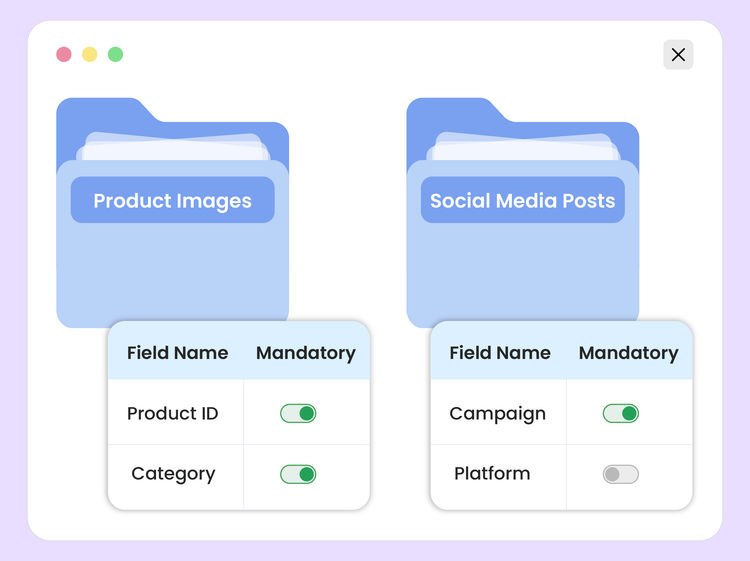
Need to keep all new campaign uploads unpublished until review, require the right metadata, and reject anything that doesn't match your standards? Want to classify product images by category, color, and season, then organize them based on those tags? Need to generate a transformation URL for a campaign asset, but don't want to piece together the syntax parameter by parameter?
These are exactly the kinds of jobs modern DAM systems are supposed to make possible. But in practice, they often involve a mix of query syntax, JSON configuration, transformation parameters, metadata schemas, path policy logic, and bulk actions across hundreds of files. The capability is there, but the path to using it well is still too technical for most day-to-day workflows.
Today, we're introducing DAM Agent: an AI assistant built into the ImageKit dashboard that helps you work with your digital assets using natural language.
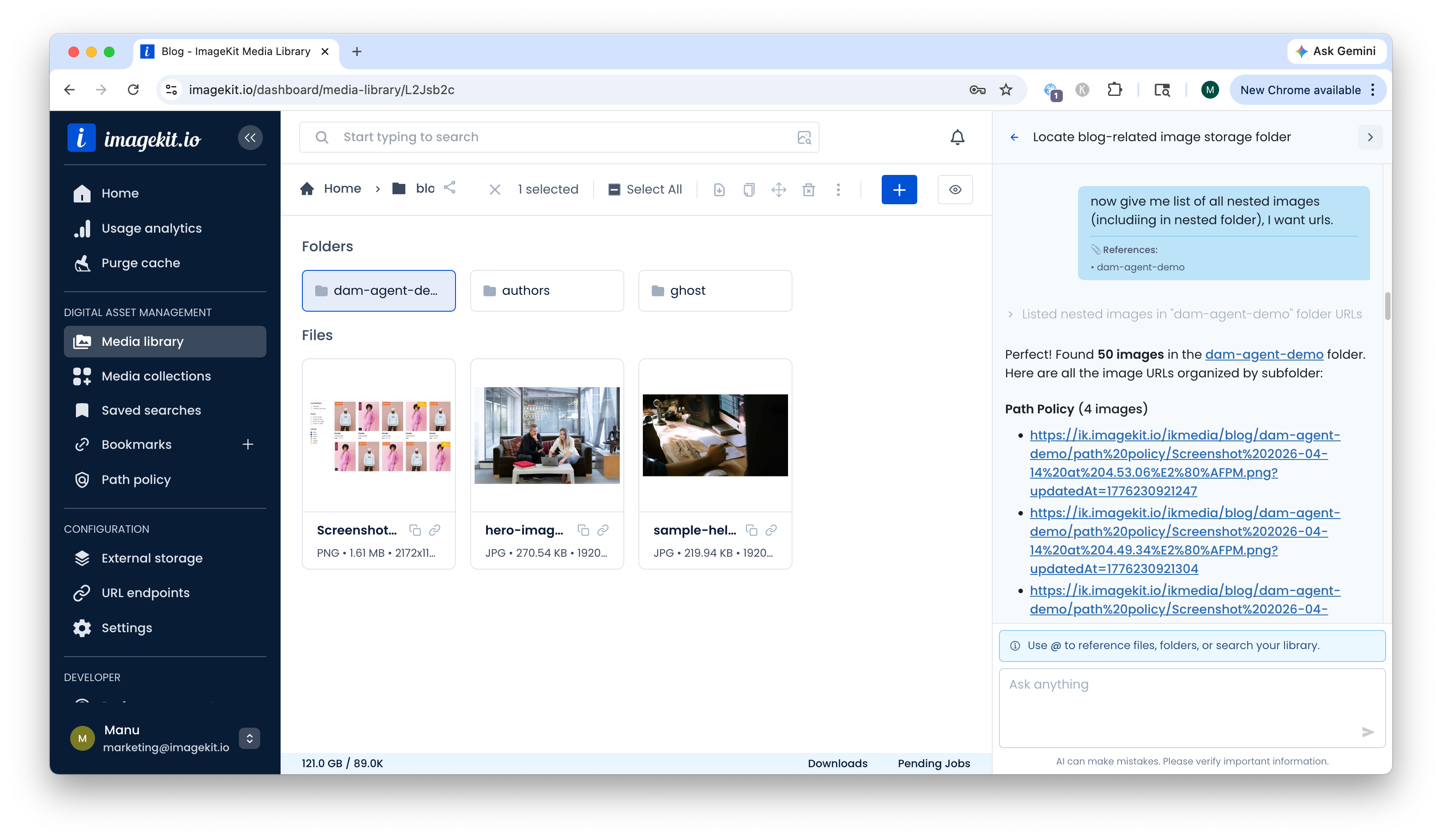
DAM Agent brings a conversational interface to ImageKit's DAM workflows. Instead of switching between screens, docs, and configuration formats, you can describe what you want to do in plain English. The agent helps you search your media library, generate the right requests or configurations, and carry out common DAM tasks much faster.
DAM Agent is available now to all ImageKit users at no additional cost.
Whether you're organizing campaign assets, preparing variants, or setting up workflows, DAM Agent makes advanced DAM capabilities much easier to use.


What You Can Do With DAM Agent
DAM Agent turns capabilities that are usually hidden behind forms, filters, and configuration screens into something you can simply ask for.
Search Assets Faster
Search your media library using plain English instead of building complex filters by hand. Ask for "all landscape product shots uploaded last month," "draft assets missing category metadata," or "older versions of this banner," and DAM Agent can translate that into the right search logic across file name, tags, file size, dimensions, format, upload date, and custom metadata.
It can also help you use ImageKit's DAM search across more than just current files, including folders, file versions, and media collections. For image-heavy libraries, it can also guide you through visual search to find similar images. That means less clicking around and faster discovery when you only know part of what you're looking for.


Manage Custom Metadata
DAM Agent can help you create and manage custom metadata fields without digging through configuration screens.
You can ask it to:
- Create metadata fields for your workflow
- Set validation rules and default values
- Show which fields apply in a given folder or workflow
- Update metadata across many assets at once
This is especially useful when you're onboarding a new workflow or standardizing asset information across a large library. Instead of treating metadata as a one-time setup exercise, you can define it around how you actually work and search every day.


Generate Transformation URLs
If you know the result you want but not the exact syntax, DAM Agent can generate the transformation URL for you.
Describe the output in plain English, and the agent will produce a valid ImageKit transformation URL along with an explanation of the parameters used. That is useful for marketers creating channel-specific variants, designers trying a few layout options, and developers who simply want the correct URL without assembling every parameter manually.


Create Path Policies Without Starting From Scratch
Path policies are one of the most powerful ways to enforce governance in ImageKit, but they can still be intimidating when you need to define metadata rules, attach them to the right folders, and write custom logic. DAM Agent helps by explaining how path policies work, generating the code you need, and helping you create or update the policy itself.
It can help you:
- Create a new path policy for the right folders
- Understand upload and validation logic
- Generate
uploadandvalidatefunctions - Enforce metadata requirements at the folder level
- Keep uploads unpublished by default when needed
- Update an existing policy when requirements change
- Troubleshoot policy behavior when something isn't working


Set Up AI Tasks for Smarter Tagging
AI Tasks let you automatically tag and categorize assets based on your business context, but configuring them often requires carefully structured JSON.
DAM Agent makes that process conversational. You can describe the outcome you want, and it helps you:
- Define task logic around your business taxonomy
- Generate the required JSON configuration
- Connect task output to metadata fields
- Apply those workflows to assets in bulk


This is especially useful when you want consistency at scale, for example classifying thousands of product images, flagging assets for manual review, or enriching files with business-specific metadata automatically.
Run Bulk Operations With Confidence
DAM Agent can help you carry out bulk operations across hundreds or thousands of assets, including:
- Adding or removing tags
- Removing AI-generated tags
- Copying or moving files
- Renaming files
- Updating metadata
- Applying saved extensions
- Publishing or unpublishing draft assets
- Creating downloadable archives for selected assets or folders
- Deleting files
For sensitive operations, the agent shows what will happen and asks for explicit confirmation before proceeding. You move faster, but still stay in control.


Generate Images Inside Your Workflow
When you need a new visual quickly, DAM Agent can help you use image generation in ImageKit DAM without leaving the same workspace where the rest of your assets already live.
This is useful for quick mockups, placeholder visuals, campaign concepts, or first-draft creative variations when the job starts with an idea rather than an existing asset. Instead of moving to a separate tool, generating something, and then bringing it back into the DAM, you can do it as part of the same conversation.


Guidance and Support
Not every interaction needs to end with an action. Sometimes you just need help understanding what to use, how features fit together, or what the best next step should be for a given workflow.
DAM Agent can explain DAM concepts, compare approaches, and guide you through unfamiliar parts of the product. That makes it useful not just for executing tasks, but also for onboarding teammates and reducing the friction that usually comes with learning more advanced DAM features.


Built With Permissions and Safety in Mind
DAM Agent works within your existing ImageKit permissions. It can only access the files, folders, and actions available to your user account, following the same sharing and collaboration model already defined in your DAM.
Before destructive actions, the agent:
- Checks your permissions
- Shows you exactly what will change
- Asks for explicit approval
- Keeps those actions auditable for accounts with audit log features enabled
If you don't have permission to modify an asset, DAM Agent can't override that. Existing access controls, approval steps, and auditability still apply.
Real-World Ways Teams Can Use DAM Agent
E-commerce Workflows
Set up metadata fields for products, classify images by category or season, generate delivery URLs for storefront use cases, and organize new product images at scale without stitching together each step manually.
Campaign Preparation
Find the right assets, generate channel-specific variants, create public links for review, and organize everything into collections or folders for faster campaign execution.
Governance and Compliance
Create path policies, enforce metadata standards, keep sensitive assets unpublished until review, and reduce the risk of inconsistent uploads or accidental changes.
Getting Started
DAM Agent is available now in the ImageKit dashboard. Look for the sparkle icon to open it.
A few good prompts to start with:
- "Show me the largest files in my media library"
- "Explain custom metadata fields"
- "Create a transformation URL to resize an image to 500px wide"
- "Show me older versions of this file"
Once you're comfortable, you can try more advanced requests like:
- "Create a path policy that automatically applies background removal"
- "Set up an AI task to tag products by category"
- "Find and organize all campaign assets from last quarter"
- "Create a password-protected public link for this collection that expires next week"
Your conversations are saved, so you can come back to them later and continue where you left off.
Try DAM Agent Today
DAM Agent makes ImageKit's advanced DAM capabilities easier to use by turning complex workflows into simple conversations.
If you manage digital assets regularly, it can help you move faster, reduce manual work, and make better use of capabilities that previously felt too technical or too time-consuming to use well.
Open your ImageKit dashboard and start your first conversation with DAM Agent. It's currently available at no additional cost.
Questions or feedback? Email us at support@imagekit.io or share your use case in our community forum.