
A Vimeo alternative without the enterprise price tag
Own your entire video experience - customize it to your brand, control playlists and recommendations, and support everything from widescreen 16:9 to vertical 9:16 video, while ImageKit handles hosting, streaming, and subtitles with usage-based pricing and no per-seat fees.









WHY IMAGEKIT
Why teams choose ImageKit over Vimeo
Stream on-demand videos
Adaptive bitrate streaming (HLS and DASH) that works with all standard video players, or optimized progressive streaming for short videos. Vimeo needs the Standard plan (from $25/seat/month) for third-party players and has a 2TB/month self-serve bandwidth threshold.
Use the storage you already use
Deliver straight from S3, GCS, Azure, or your web server without moving originals. Vimeo plays only videos uploaded to and stored on Vimeo.
A branded player with AI subtitles and shoppable video
Add AI subtitles, translations, chapters, playlists, and shoppable video with ImageKit's player. On Vimeo, custom branding needs the Standard plan (from $25/seat/month), AI chapters need the Advanced plan (from $75/seat/month), and interactive video is Enterprise-only.
Transform images and videos from the URL
Resize, crop, trim, and add overlays by changing the URL, and smart-crop 16:9 video to 9:16, with one API and CDN for images and video. Vimeo has no URL transformations or image delivery.
Integrated DAM for better video management
Manage videos and images together with structured metadata, tags, versions, and time-stamped feedback in an integrated Agentic DAM. On Vimeo, structured metadata is Enterprise-only and its AI library search can't make changes.
See a live demo below
View full documentation
Embed without code, or build on the Video API
Copy an embed URL from the Media Library and publish video anywhere, no code required. Or use ImageKit's Video API to upload, transform, and stream from your own code, with adaptive bitrate streaming (HLS and DASH), or progressive streaming for shorter videos, automatically optimized to WebM (AV1 or VP9) or MP4 (H.264) based on the viewer's device, plus real-time URL transformations.
Vimeo's player carries Vimeo branding by default. Removing it, or using direct file links in your own player, requires the Standard plan (from $25/seat/month) or above, its AI, Live, and Webinar APIs are Enterprise-only, and self-serve plans have a 2TB/month bandwidth threshold. Vimeo's own player can use AV1 on supported devices, but its progressive links are fixed, single-resolution MP4 files, shown as H.264 in Vimeo's API docs.

Store your library once, with no per-seat fees
Deliver straight from your own S3, GCS, or Azure storage and skip paying to store a second copy of your library. ImageKit's usage-based pricing has no per-seat fees: the Pro plan ($89/month) includes 5,000 seconds of SD or 2,500 seconds of HD processing, Media Library storage is $9 per 100 GB if you use it, cached outputs avoid repeat processing charges and aren't billed as storage, and custom plans lower unit costs at scale.
Vimeo plays only videos uploaded to and stored on Vimeo, and charges per seat (Starter $12, Standard $25, Advanced $75 per seat/month, billed annually), with a 2TB/month self-serve bandwidth threshold. Its 2026 Plan Usage Policy lets Vimeo move accounts it classifies as businesses onto pricier plans such as Studio ($400/month).

A video player with AI subtitles, chapters, playlists, and shoppable video built in
ImageKit's AI-powered Video Player auto-generates subtitles in 100+ languages, translations, and chapters, plus playlists, recommendations, shoppable video, and a floating player. Prefer your own? ImageKit's HLS and DASH streams work with all standard players.
Vimeo auto-captions on every plan, but subtitle translation uses AI credits, AI chapters need the Advanced plan (from $75/seat/month), showcases offer playlists without recommendations, and interactive video is Enterprise-only.

Enterprise video analytics, built into the player
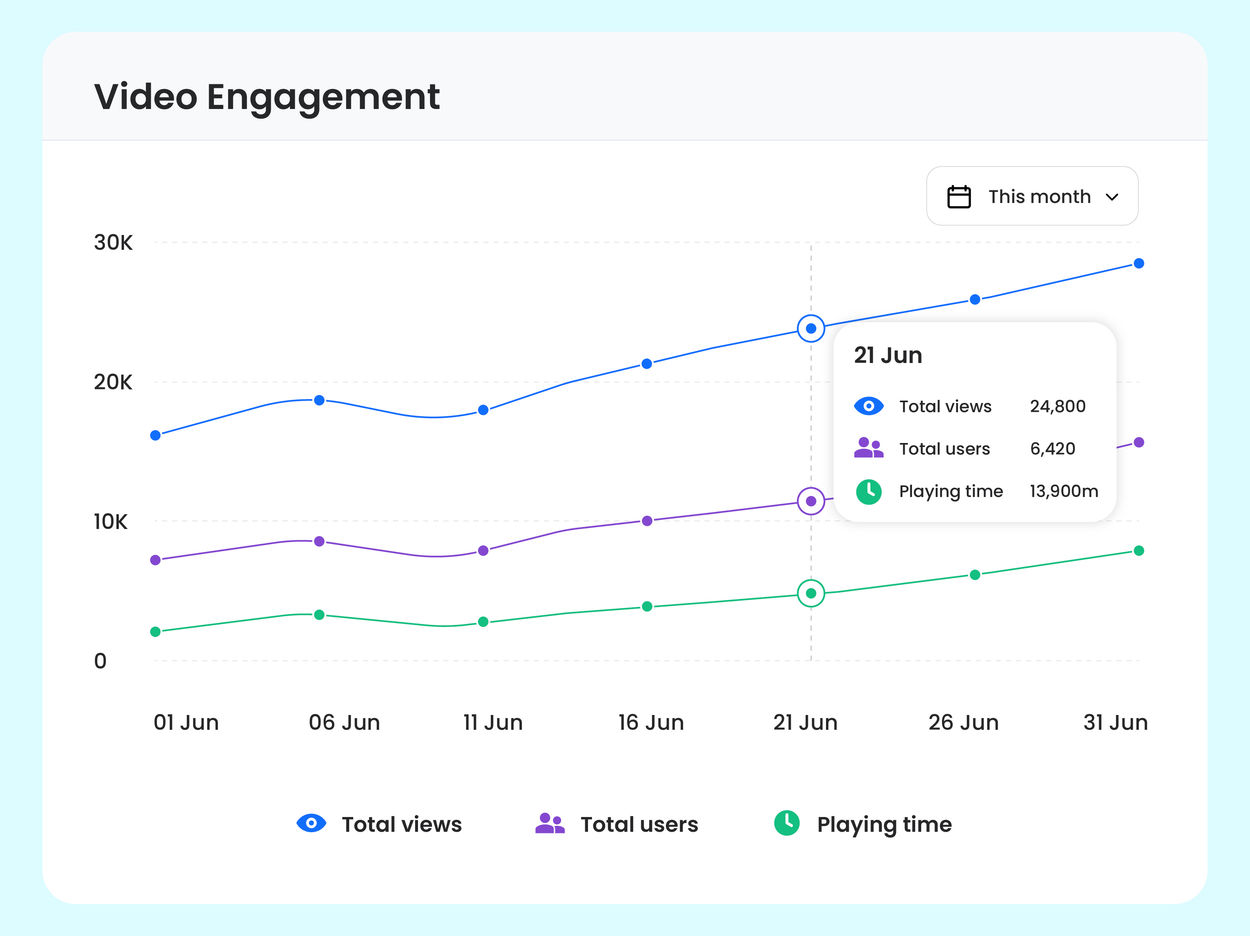
On Enterprise plans (currently in beta), track engagement, quality of experience, and playback errors in ImageKit's Video Player, and slice any metric by device, geo, video, or custom dimensions. No third-party integration, no cookies, and no PII by default.
Vimeo includes viewer analytics on every plan and engagement analytics from the Starter plan (from $12/seat/month), while team-level analytics and AI-powered custom analytics are Enterprise-only.
Transform videos on delivery, including 16:9 to 9:16
ImageKit lets you resize, crop, trim, add overlays, and generate thumbnails by changing the delivery URL, without creating a new asset for every variation. Smart crop with face and object detection keeps the subject in focus as you reframe landscape video to 9:16 for social and mobile, from the same source file.
Vimeo's editor can trim, crop, and switch the canvas between 16:9, 9:16, and 1:1 by hand, with no subject tracking. There's no URL-based transformation API, and overlays and hotspots require Enterprise.
Serve your images from the same API as your video
ImageKit's image transformations and video transformations share one URL-based API and one CDN, with automatic optimization, caching, and signed URLs. Product, marketing, and video media go through one integration and one bill.
Vimeo is video-only, with no image hosting or image CDN, so product and marketing images need a separate service.
An integrated Agentic DAM for your video library
ImageKit's integrated Agentic DAM organizes videos and images with structured metadata and tags, shares them with the right access levels, collects time-stamped feedback, and keeps every version in one place, with AI that searches, tags, and runs bulk operations for you.
Vimeo also offers folders, version history, and time-stamped review comments, but structured metadata and folder permissions are Enterprise-only, and Smart Library Search is an Enterprise add-on that searches but can't make changes.

One global delivery network for all your media
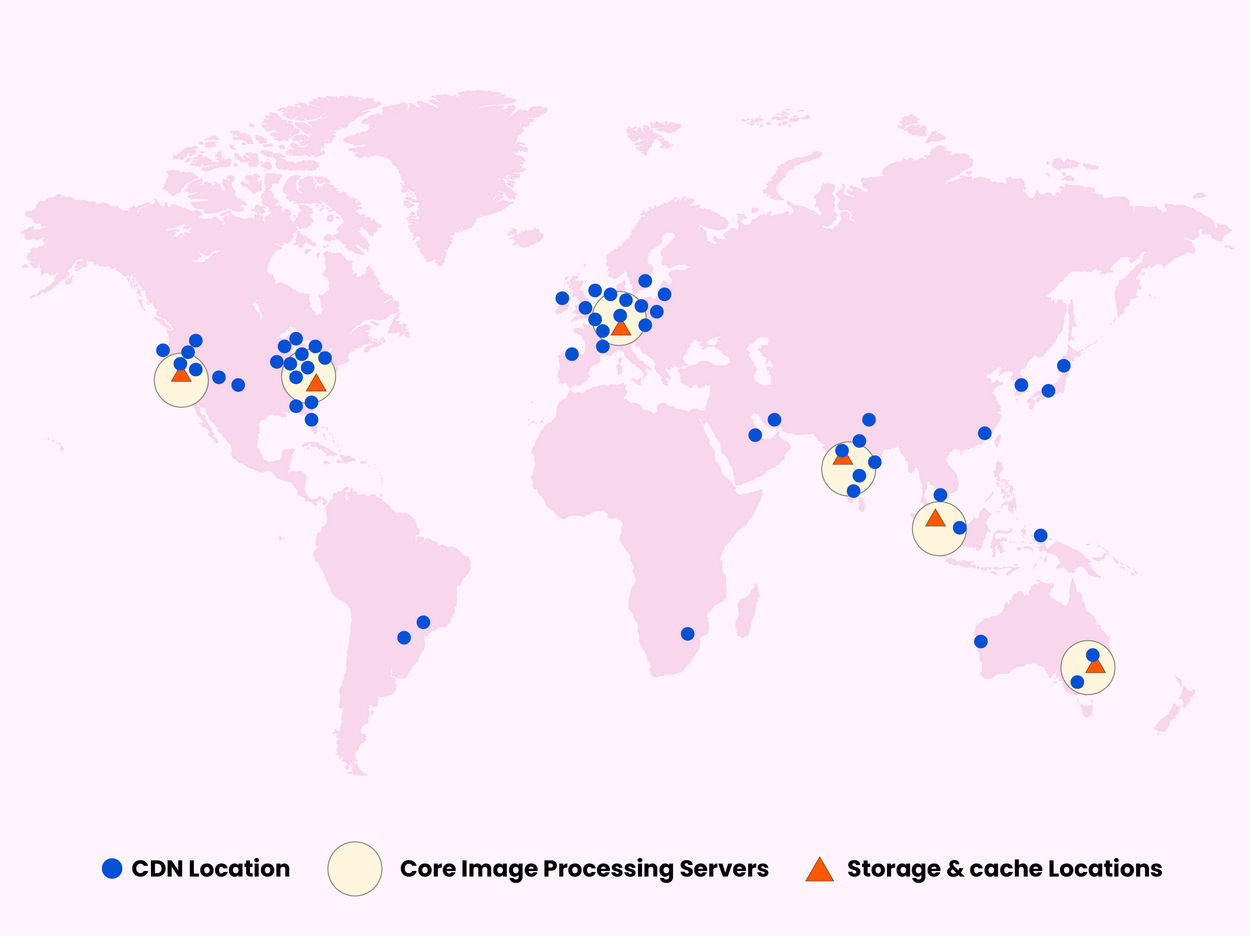
ImageKit delivers images and video through AWS CloudFront with 700+ edge nodes and 7 processing regions, and lets you choose where media is processed to meet data residency and compliance requirements.
Vimeo delivers only video, and choosing where it's stored (EU data residency) is Enterprise-only.
WHERE VIMEO FITS
When Vimeo is the better fit
Live events and webinars
Stream live over RTMPS or SRT, simulcast to YouTube, LinkedIn, and other platforms, and run webinars with registration, Q&A, and polls on Vimeo's Advanced (from $75/seat/month) and Enterprise plans. ImageKit is built for on-demand video and does not support live streaming.
Selling video through branded apps
Vimeo Streaming (formerly Vimeo OTT) builds branded apps for TV and mobile, with subscriptions and rentals. ImageKit delivers and optimizes video but has no paywalls, subscriptions, or OTT apps.
DRM-protected content
Vimeo Enterprise offers DRM with Widevine, PlayReady, and FairPlay as an add-on. ImageKit secures video with signed URLs, private files, and access controls, but does not provide DRM.
Recording, editing, and AI dubbing
Vimeo bundles a screen recorder, teleprompter, AI script generator, and text-based editing, with AI audio dubbing and Ask AI on Enterprise. ImageKit's AI video features focus on subtitles, translations, and chapters, while image AI generates descriptions and AI Tasks handle metadata and tagging.
ImageKit vs. Vimeo: detailed comparison
| Feature | ImageKit | Vimeo |
|---|---|---|
| Video hosting & library | Integrated Agentic DAM with version history and restore, custom metadata, tags, advanced search, time-stamped feedback, collaboration, and granular permissions, where AI searches assets, manages metadata and taxonomy, and runs bulk operations. Advanced governance (Path Policies) on Enterprise. | Video library with folders, version history, content search, time-stamped review comments, and collaboration. Structured metadata and folder-level permissions are Enterprise-only. Smart Library Search (AI search) is an Enterprise add-on, and the Vimeo MCP Server is in public beta; both focus on search and Q&A. |
| Adaptive bitrate streaming | HLS and DASH generated in real time from a single URL parameter, playable in ImageKit's Video Player or any HLS/DASH player. Standard optimizations also apply to progressive streaming for shorter videos. | Adaptive bitrate (HLS/DASH) auto-generated after upload, without per-request URL control over renditions. Direct file links for third-party players require the Standard plan or above. |
| External and hosted storage | Deliver video directly from S3, GCS, Azure Blob Storage, or web servers without moving originals, or host them in ImageKit's Media Library. | No option to stream from your own storage. Videos are uploaded or pulled into Vimeo and played from Vimeo-hosted copies. |
| Automatic optimization & delivery | Automatic format conversion (AV1, VP9, H.264) and compression, delivered via AWS CloudFront with 700+ edge nodes and 7 processing regions. | Automatic transcoding and adaptive delivery after upload, without request-time transformations. Storage region choice (EU data residency) is Enterprise-only. |
| AI subtitles & translations | AI subtitles and translations, included on the free plan (uses extension units). | Automatic captions on all plans, including Free; AI subtitle translation billed per minute with AI credits. |
| AI chapters | AI chapters, included on the free plan (uses extension units). | AI chapters on the Advanced plan and above; manual chapters on all plans, including Free. |
| Playlists and recommendations | Native playlist and recommendation widgets in the Video Player. | Showcases (playlists) and "More videos" end screens (Standard plan and above), with no algorithmic recommendations. |
| Real-time video optimization & transformation via URL | Resize, crop, trim, watermark, overlay, and personalize via URL parameters. Variants render on first request and cache, with no encoding pipeline to manage. | No real-time URL transformation API. Editing and trimming tools only; overlays and hotspots require Enterprise. |
| URL-based smart cropping at delivery | AI tracks the subject across frames, so you can reframe a video from 16:9 to 9:16 without manual editing. | No AI reframing. The editor switches the canvas between 16:9, 9:16, and 1:1 by hand. |
| Image optimization & delivery | The same URL-based API and CDN transform and optimize images alongside your videos. | Video-only; no image hosting or image CDN. |
| Interactive & shoppable video | On every plan: product sidebars, timed highlights, and clickable hotspots. | Interactive video is Enterprise-only; CTAs, cards, and end screens from the Standard plan. |
| Video player & branding | Use any compatible player or ImageKit's AI player, with custom branding, playlists, recommendations, shoppable video, subtitles, chapters, and analytics. | Vimeo-branded player by default. Customization from the Starter plan; branding and third-party players from the Standard plan. |
| Analytics | 20+ metrics, available on Enterprise plans, currently in beta. | Basic viewer analytics free; engagement and social from the Starter plan; team-level and AI custom analytics on Enterprise. |
| Live streaming & webinars | ImageKit is built for on-demand video and does not support live streaming. | Live streaming over RTMPS or SRT, simulcasting, and webinars with registration, Q&A, and polls on the Advanced and Enterprise plans. |
| Video monetization (OTT) | No paywalls, subscriptions, or OTT apps. | Vimeo Streaming (formerly Vimeo OTT) offers subscriptions, rentals, and branded TV and mobile apps. |
| DRM | ImageKit provides signed URLs and private-file workflows, but does not provide DRM-based content protection. | DRM (Widevine, PlayReady, FairPlay) as an Enterprise add-on. |
| Developer tools & integrations | REST APIs for uploads, media delivery, transformations, and DAM; server-side and client SDKs; Video Player SDK; framework and CMS integrations; webhooks; and AI tooling including DAM, Admin, and DevTools MCP servers, agent skills, and plugins for AI coding assistants. | REST API with resumable and pull uploads, official Node, Python, PHP, and Java libraries, Player SDK, webhooks, oEmbed, and an MCP server (public beta). AI, Live, and Webinar APIs are Enterprise-only. |
| Pricing model | Usage-based pay-as-you-go with no per-seat fees. Every plan includes 500 seconds of SD video processing a month; the Pro plan ($89/month) includes 5,000 seconds of SD or 2,500 seconds of HD processing, then $9 per 10,000 video processing units (1 unit = 1 second of SD). Media Library storage is $9 per 100 GB, and optional if you deliver from your own storage. Cached outputs avoid repeat processing charges and aren't billed as storage, and custom plans lower unit costs at scale. | Per-seat subscriptions (Starter $12, Standard $25, Advanced $75 per seat/month, billed annually), being replaced by Creator, Core, Professional, and a $400/month Studio plan, plus custom Enterprise. Self-serve plans have a 2TB/month bandwidth threshold; interactive video, custom permissions, SSO/SCIM, and team analytics require Enterprise. |
| Forever free plan | 3 GB storage, 500 seconds/month of SD video processing, 20 GB bandwidth, 2 users, and full access to the Video API and Player SDK. | Unlimited public (non-embeddable) videos, but only 3 GB for embeddable or private videos and 1 TB/month bandwidth for them; one seat, folders, basic viewer analytics, and embedding. |
| Privacy and Security | Signed URLs with configurable expiry on all plans; IP, referrer/domain, and country restrictions on Enterprise. | Domain-restricted embeds and password/unlisted privacy on paid plans; geoblocking requires Enterprise. |
| Access control and sharing | Granular permissions for users and groups, media collections, draft assets, and public links. | Team sharing and video-level permissions on paid plans; advanced folder and custom permissions on Enterprise. |
| Custom domain | Available on the Pro plan ($89/month). | Branded yourcompany.vimeo.work subdomain on Enterprise only; your own domain only for Showcase pages (Standard plan and above). |
| G2 rating | 4.7/5 | 4.3/5 |