
The Mux alternative that streams from your own storage
Transform video and images by URL, stream HLS/DASH straight from S3, GCS, or Azure, and ship a player with AI subtitles and shoppable video, without storing your library twice.










WHY IMAGEKIT
Why teams choose ImageKit over Mux
Stream on-demand videos
Adaptive bitrate streaming (HLS and DASH) that works with all standard video players, or optimized progressive streaming for short videos, with signed URLs.
Use the storage you already use
Deliver straight from S3, GCS, Azure, or your web server without moving originals. Mux ingests and bills you for a copy.
A branded player with AI subtitles and shoppable video
Generate AI subtitles, translations, and chapters right in ImageKit's player, with playlists and shoppable video built in. On Mux, translation and chapters are Robots API jobs you wire into the player yourself, and playlists are yours to build.
Transform images and videos from the URL
Resize, crop, trim, and add overlays by changing the URL, with one transformation API and CDN for images and video and automatic optimizations. Mux can't crop, resize, or overlay video from the URL, and its image API only makes thumbnails.
Integrated DAM for better video management
Organize videos with metadata and tags, track every iteration with versions, and collect time-stamped feedback in an integrated Agentic DAM with access controls. Mux has three fixed metadata fields and a passthrough string, with no custom metadata schema, tags, search, versioning, or review workflow.
See a live demo below
View full documentation
Stream video and create new variations through a URL-based API
Use ImageKit's Video API to upload, transform, and stream video from your own code, with adaptive bitrate streaming (HLS and DASH), or progressive streaming for shorter videos where adaptive is overkill, automatically optimized to WebM (AV1 or VP9) or MP4 (H.264) based on the viewer's device. Real-time URL transformations derive new variants on request, including smart crop that keeps the subject in focus as you reframe 16:9 video to 9:16, and image and text overlays.
Mux is API-first too: you create an asset through its API and play it back with an HLS playback ID. Mux can't crop, resize, or overlay video from the URL, so a new variation, such as a different crop, means encoding a new asset. For progressive playback, MP4s are opt-in static renditions you enable per asset, with extra storage fees, and Mux recommends HLS for most playback. Both are delivered in H.264, with no documented AV1, VP9, or WebM output.
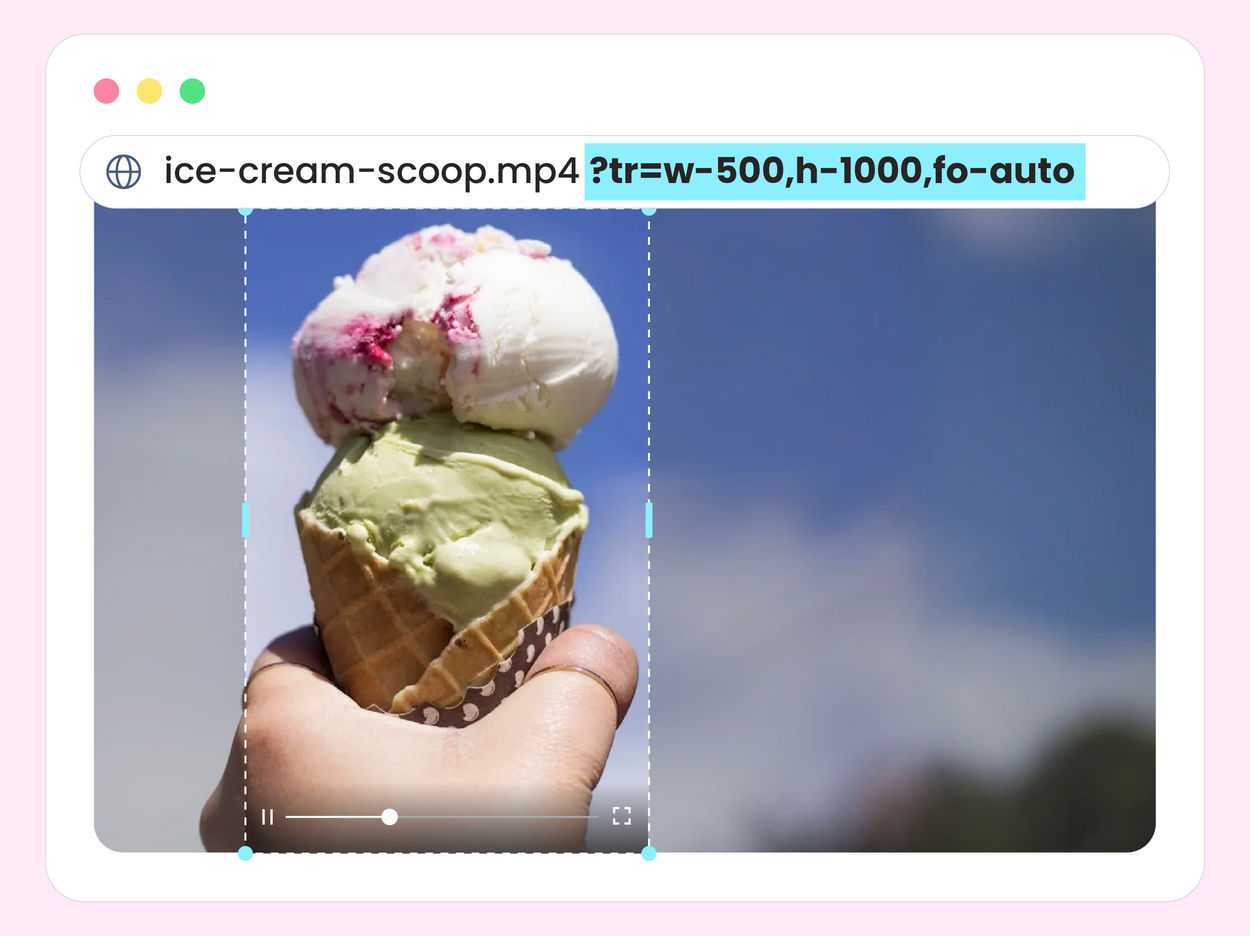
Embed and share videos from your Media Library
Copy an embed URL from the Media Library and publish video across websites, apps, blogs, or landing pages, with adaptive bitrate streaming adjusting to every viewer's network and no code required.
Mux Player can be embedded too, but on the free plan it shows a Mux badge and caps playback at 1080p.

No need to re-upload videos to ImageKit
Deliver straight from your own S3, GCS, or Azure storage and skip paying to store a second copy of your library. ImageKit's usage-based pricing covers bandwidth, storage, and processing: Media Library storage is $9 per 100 GB if you use it, cached outputs avoid repeat processing charges and aren't billed as storage, and custom plans lower unit costs at scale.
Mux plays only videos ingested as Mux assets and bills for storing them per minute, on top of any originals you keep in your own storage. Basic-quality encoding is free, while storage and delivery are billed by the minute across quality tiers and resolutions.

A video player with AI subtitles, chapters, playlists, and shoppable video built in
ImageKit's AI-powered Video Player auto-generates subtitles in 100+ languages, translations, and chapters, plus playlists, recommendations, shoppable video, and a floating player. Prefer your own? ImageKit's HLS and DASH streams work with all standard players.
Mux Player covers playback and theming. Playlists are sample code, there's no shoppable video, and caption translation and chapters are Mux Robots API jobs you wire into the player yourself.

Enterprise video analytics, built into the player
On Enterprise plans (currently in beta), track engagement, quality of experience, and playback errors in ImageKit's Video Player, and slice any metric by device, geo, video, or custom dimensions. No third-party integration, no cookies, and no PII by default.
Mux Data is free for video hosted on Mux, but its web SDKs set a tracking cookie by default, and standalone Mux Data charges $499/month for monitoring dashboards and exports.
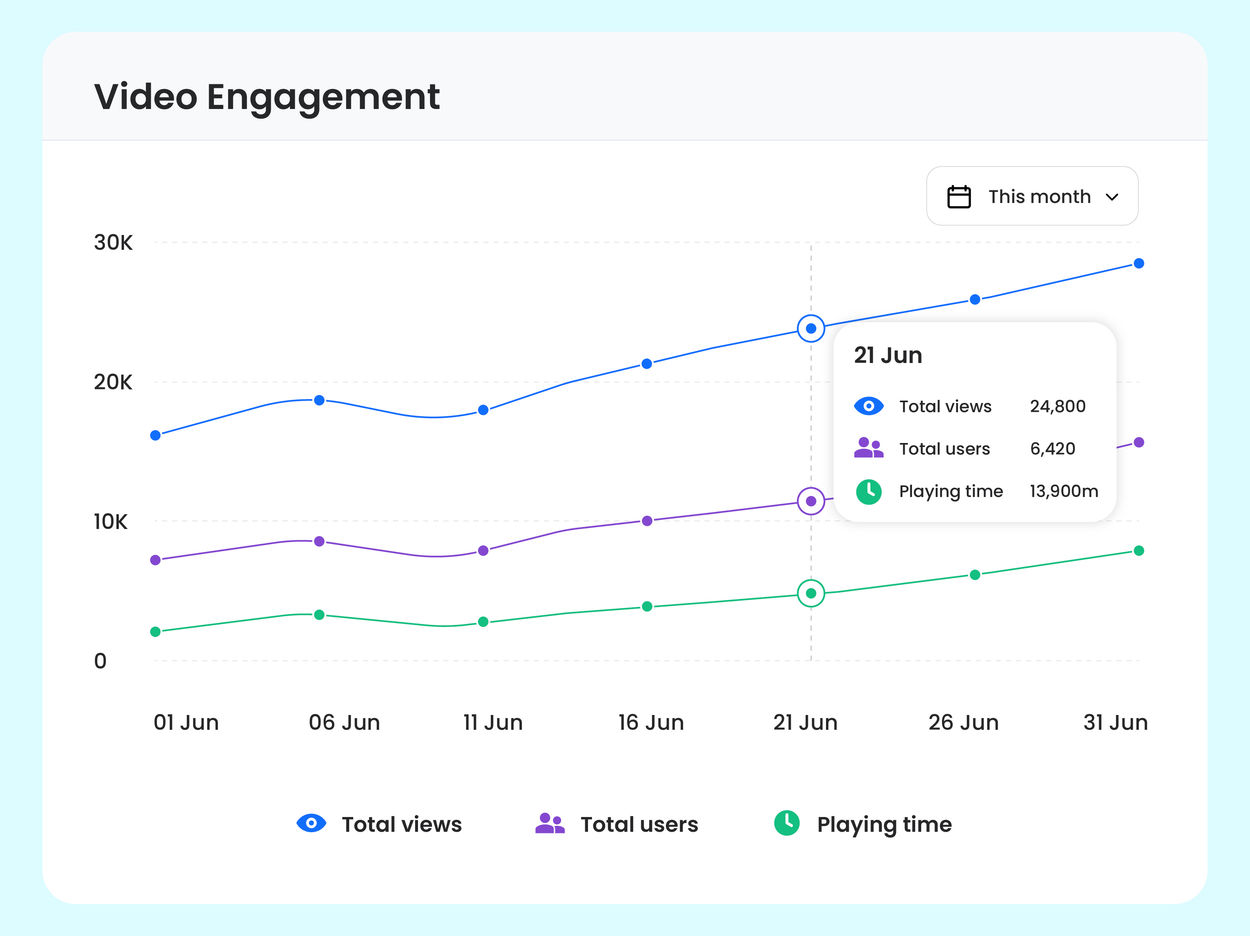
Serve your images from the same API as your video
ImageKit's image transformations and video transformations share one URL-based API and one CDN, with automatic optimization, caching, and signed URLs. Product, marketing, and video media go through one integration and one bill.
Mux is video-only. Its image API generates thumbnails and animated previews from your Mux videos, so product and marketing images need a separate image CDN.
Manage, review, and version videos, not just store them
ImageKit's integrated Agentic DAM organizes every video with structured metadata and tags so it's instantly searchable, shares it with the right access levels, collects time-stamped feedback for precise reviews, and keeps every new version and comment in one place.
Mux stores three fixed metadata fields (title, creator ID, and external ID) and a passthrough string, with no custom metadata schema, tags, or search, and no versioning or review workflow, so teams manage organization and approvals in a separate tool.

One global delivery network for all your media
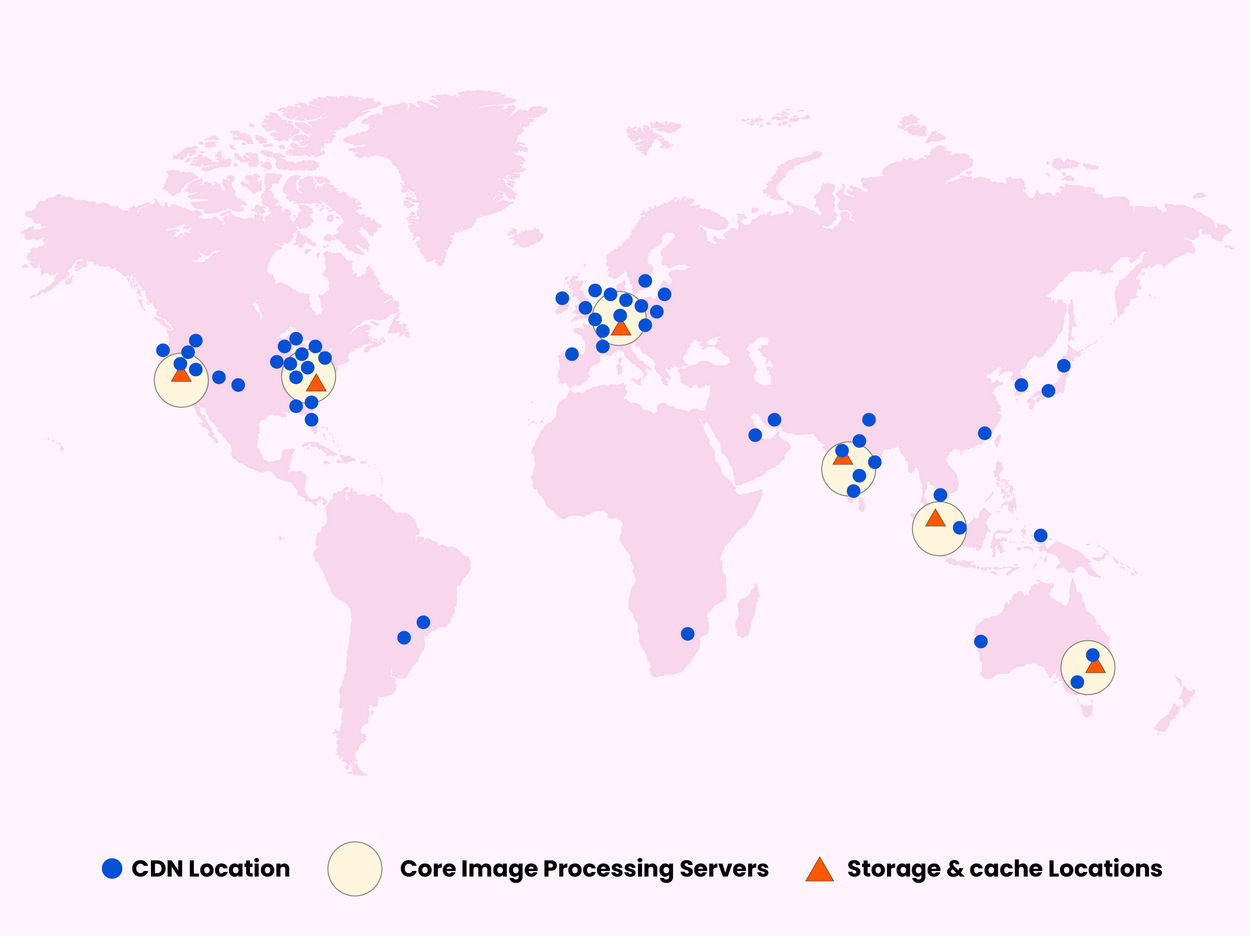
ImageKit delivers images and video through AWS CloudFront with 700+ edge nodes and 7 processing regions, and lets you choose where media is processed to meet data residency and compliance requirements.
Mux delivers video through a multi-CDN setup optimized for streaming. It doesn't deliver your images, so the rest of your media needs its own CDN.
WHERE MUX FITS
When Mux is the better fit
Live streaming and simulcasting
Broadcast live events over RTMP, RTMPS, or SRT with low-latency options, and simulcast them to platforms such as YouTube and Twitch. ImageKit is built for on-demand video and does not support live streaming.
DRM-protected content
Protect premium or licensed content with DRM. ImageKit secures video with signed URLs, private files, and access controls, but does not provide DRM.
Native mobile players and offline playback
Mux Player SDKs for iOS and Android give you native playback and offline downloads, including DRM-protected content. ImageKit's Video Player is for the web; its HLS and DASH streams play in any native player you choose.
AI video intelligence
Mux Robots, Mux's hosted AI workflows API, can generate video summaries, moderate content, and answer questions about what's in a video. ImageKit's AI video features focus on subtitles, translations, and chapters, while image AI generates descriptions and AI Tasks handle metadata and tagging.
ImageKit vs. Mux: detailed comparison
| Feature | ImageKit | Mux |
|---|---|---|
| Video player SDK | Use ImageKit's AI-powered Video Player SDK for web or any compatible HLS/DASH player. Configure the player UI, branding, and playback behavior. | Mux Player (web, iOS, Android) with theming; no built-in playlists, recommendations, or shoppable UI. |
| Adaptive bitrate streaming | Generate HLS and MPEG-DASH streams with variants from 240p through 4K, playable in ImageKit's Video Player or any HLS/DASH player. Standard optimizations also apply to progressive streaming for shorter videos. Available on Forever Free. | Deliver adaptive HLS playback using just-in-time encoding and playback IDs. |
| Live streaming & simulcasting | ImageKit is built for on-demand video and does not support live streaming. | Live streaming with RTMP, RTMPS, and SRT ingest, standard, reduced, and low-latency modes, automatic recordings, webhooks, and simulcasting to third-party platforms. |
| Downloads and offline playback | ImageKit provides video URLs and delivery APIs, but its player workflow does not include native offline playback. | Mux supports static MP4 renditions and native offline downloads through its iOS and Android player SDKs, including DRM-protected content. |
| Playlists and recommendations | Provides native playlist and recommendation widgets; configure the video lists and recommendations in the Video Player. | Play developer-supplied playlists; playlist UI and recommendations require your own implementation. |
| Interactive and shoppable video | Add product links, overlays, and hotspots for shoppable video. Available on the Forever Free plan. | No native shoppable-video feature. |
| AI subtitles & translations | Automatically generate subtitles with AI, add word-level highlighting, and translate them into multiple languages, generated in the Video Player. Available on Forever Free (uses extension units). | Automatically generate captions and transcripts at no extra cost. Mux Robots (Beta), Mux's hosted AI workflows API, can translate existing caption tracks into other languages as a separate API job, which you then add to your player. |
| AI chapters | Automatically generate navigable chapter markers in the Video Player. Available on Forever Free (uses extension units). | Generate timestamped chapters from a captioned video asset with a Mux Robots API job, then retrieve the results through the API or a webhook and wire them into your player. |
| Video analytics | Track engagement, playback errors, and quality of experience without cookies, built into the same player and platform as your video delivery. Available on Enterprise plans, currently in beta. | Mux Data is free for video hosted on Mux; its web SDKs set a tracking cookie by default (can be disabled). Standalone Mux Data is priced by monthly views: free up to 100,000, with monitoring dashboards and data exports from $499/month. |
| Video intelligence | ImageKit's AI video features focus on subtitles, translations, and chapters, while image AI generates descriptions and AI Tasks handle metadata and tagging, with no built-in workflows for video summaries, moderation, or video Q&A. | Mux Robots can summarize videos, detect scenes, moderate content, find key moments, answer questions, and generate engagement insights. |
| Video transformations | Resize, crop, trim, add overlays, and generate thumbnails with URL parameters. | No URL transformation API for video: Mux can't crop, resize, or overlay video from the URL. Thumbnail URLs offer basic resize/crop, and watermarks must be set at ingest. |
| Audio handling | Transform audio and video through URL parameters: for example, mute a video, extract audio, or control codecs. | Add primary and alternate audio tracks, deliver audio-only assets, and adjust audio levels through API operations. |
| External and hosted storage | Deliver video directly from S3, GCS, Azure Blob Storage, or web servers without moving originals, or host them in ImageKit's Media Library. Available on Forever Free. | Imports videos from your storage, but plays them only from a processed copy billed as Mux storage, so if you keep your originals in your own storage, you pay for both. |
| CDN and media delivery | Deliver images, video, and other media through a global CDN with caching, external origins, on-demand processing, and cached transformations without moving originals into ImageKit. | Deliver video through multiple CDN partners using HLS and just-in-time encoding, with delivery optimized for video streaming. |
| Privacy, security & access control | Signed URLs, private files, and named transformations, with enterprise controls for IP, country, referrer, and user-agent restrictions. | Signed playback URLs with JWTs, domain/referrer restrictions, and user-agent restrictions. |
| DRM | ImageKit provides signed URLs and private-file workflows, but does not provide DRM-based content protection. | DRM is available as a paid add-on at $100/month plus $0.003 per license. |
| Custom domains | Available on the Pro plan at $89/month. | Available to annual-contract customers or as a paid add-on; customers without an annual contract pay $100/month. |
| Developer tools & integrations | REST APIs for uploads, media delivery, transformations, and DAM; server-side and client SDKs; Video Player SDK; framework and CMS integrations; webhooks; and AI tooling including DAM, Admin, and DevTools MCP servers, agent skills, and plugins for AI coding assistants. | Video and Data APIs; direct uploads; Player and Uploader components; server-side and mobile SDKs; CLI; webhooks; framework and CMS integrations; and AI tooling including an MCP server, agent skills, and the Robots AI workflows API. |
| Webhooks and asynchronous processing | Receive webhook events for video transformations, encoding, and upload processing. | Receive webhook events when assets are created, ready, errored, updated, or deleted, and when live-stream events occur. |
| Asset upload and ingestion | Upload files and folders to the Media Library through the dashboard or desktop app. Use the Upload API or Rclone for bulk migrations. | Upload through the Video API, a source URL, direct uploads, or Mux Uploader. |
| Video hosting & management | Host videos in an integrated Agentic DAM with folders, structured metadata and tags, search, versions, time-stamped feedback, access controls, and embed links, where AI searches assets, manages metadata and taxonomy, sets governance, and runs bulk operations. | Videos are hosted as Mux assets and managed through the Dashboard and Video API, with three fixed metadata fields (title, creator ID, and external ID) and a passthrough string; no custom metadata schema, tags, search, versioning, or review workflow. No DAM or agentic asset management; AI agents can call the API through the Mux MCP server. |
| Migration support | Preserve existing media URL patterns with built-in rewriters for Cloudinary, Imgix, and Akamai, custom URL-rewriting functions, and external-origin support. | No URL rewriter. Migrate videos (e.g. from Vimeo, Wistia, Cloudflare Stream, api.video, or S3) through Truckload or the API, then update your application to use Mux asset and playback IDs. |
| Free plan | ImageKit offers a Forever Free plan at $0/month with 20 GB monthly bandwidth, 3 GB DAM storage, 500 video processing units (500 seconds of SD video), 650 extension units, and 2 users. It includes core media delivery, transformations, streaming, and DAM features. | Mux offers a Free plan with no credit card required, supporting up to 10 stored videos and on-demand video only, with playback capped at 1080p and a Mux badge on the player. |
| Storage and delivery billing | Usage-based billing for bandwidth, storage, video processing units, and extension units. Every plan includes 500 seconds of SD video processing a month; the Pro plan ($89/month) includes 5,000 seconds of SD or 2,500 seconds of HD processing, then $9 per 10,000 video processing units (1 unit = 1 second of SD). Media Library storage is $9 per 100 GB, and optional if you deliver from your own storage. Cached outputs avoid repeat processing charges and aren't billed as storage, and custom plans lower unit costs at scale. | Usage-based pricing across encoding (free at basic quality), storage, and delivery minutes, with quality tiers, resolution multipliers, and add-ons such as DRM, live captions, simulcasting, and Mux Robots. |
| G2 rating | 4.7/5 | 4.4/5 |